Quickstart: Visa Requirements
Get up and running with the Requirements API to display visa requirements for your travelers.
What you'll build
In this quickstart, you'll learn how to fetch and display visa requirements using the /v3/trips endpoint. We'll cover:
- Making an API request for a specific trip
- Extracting visa requirements from the response
- Displaying requirements with apply links
Prerequisites
Before you start, you'll need:
- An API key from Sherpa (get API access)
- Basic knowledge of HTML and JavaScript
Step 1: Make the API call
Here's a request for a British passport holder traveling from London to New York:
const API_KEY = 'YOUR_API_KEY_HERE';
const API_URL = 'https://requirements-api.joinsherpa.com/v3/trips?include=procedure';

const tripData = {
  data: {
    type: 'TRIP',
    attributes: {
      locale: 'en-US',
      traveller: {
        passports: ['GBR']
      },
      currency: 'USD',
      travelNodes: [
        {
          type: 'ORIGIN',
          airportCode: 'LHR',
          departure: {
            date: '2025-07-08',
            time: '12:59',
            travelMode: 'AIR'
          }
        },
        {
          type: 'DESTINATION',
          airportCode: 'JFK',
          arrival: {
            date: '2025-07-08',
            time: '12:59',
            travelMode: 'AIR',
            flightNumber: 'AA1234'
          }
        }
      ]
    }
  }
};

fetch(API_URL, {
  method: 'POST',
  headers: {
    'Content-Type': 'application/vnd.api+json',
    'x-api-key': API_KEY
  },
  body: JSON.stringify(tripData)
})
  .then(response => response.json())
  .then(data => displayVisaRequirements(data))
  .catch(error => console.error('Error:', error));
🔑 API Key Security: Never expose your API key in client-side code. In production, make API calls from your backend server.
Step 2: Understanding the response
The response contains two key parts:
informationGroups - Categories of requirements (visa, health, documents, etc.)included - Detailed requirement objects referenced by ID
To get visa requirements, find the group where type === 'VISA_REQUIREMENTS', then look up each requirement's details in the included array.
{
  "data": {
    "attributes": {
      "headline": "Most travelers from London (LHR) can enter New York (JFK)...",
      "informationGroups": [
        {
          "name": "Visa Requirements",
          "type": "VISA_REQUIREMENTS",
          "enforcement": "MANDATORY",
          "headline": "You need an ETA for United States if you have a British passport.",
          "groupings": [
            {
              "name": "New York (JFK)",
              "enforcement": "MANDATORY",
              "data": [
                {
                  "type": "PROCEDURE",
                  "id": "5683d46a-9338-41b1-a1f5-897a598e9a57"
                }
              ]
            }
          ]
        }
      ]
    }
  },
  "included": [
    {
      "id": "5683d46a-9338-41b1-a1f5-897a598e9a57",
      "type": "PROCEDURE",
      "attributes": {
        "title": "Electronic Travel Authorization (ESTA)",
        "description": "Travelers need a travel authorization to visit United States...",
        "enforcement": "MANDATORY",
        "actions": [
          {
            "type": "LINK",
            "title": "Apply for ESTA",
            "url": "https://sherpa-widget.joinsherpa.io/applications/products/USA_ESTA...",
            "provider": "sherpa",
            "product": {
              "name": "USA ESTA",
              "price": { "value": 41, "currency": "USD" }
            }
          }
        ]
      }
    }
  ]
}
📋 Response Variations
The API response structure can vary depending on your API key type and the
specific trip. Some responses may include detailed informationGroups with
requirements, while others might return a simpler structure with just the trip
details. The HTML example below handles both cases gracefully.
Step 3: Display visa requirements
Here's a complete HTML page that extracts and displays visa requirements:
<!DOCTYPE html>
<html lang="en">
<head>
  <meta charset="UTF-8">
  <meta name="viewport" content="width=device-width, initial-scale=1.0">
  <title>Visa Requirements</title>
  <style>
    body { font-family: system-ui, sans-serif; max-width: 600px; margin: 2rem auto; padding: 0 1rem; }
    .summary { background: #f0f7ff; padding: 1rem; border-radius: 8px; margin-bottom: 1.5rem; }
    .grouping-name { font-weight: 600; color: #374151; margin: 1rem 0 0.5rem; }
    .requirement { display: flex; align-items: flex-start; gap: 0.75rem; padding: 1rem; background: #fff; border: 1px solid #e5e7eb; border-radius: 8px; margin-bottom: 0.5rem; }
    .requirement img { width: 24px; height: 24px; }
    .visa-title { font-weight: 500; }
    .visa-description { color: #6b7280; font-size: 0.875rem; margin: 0.25rem 0; }
    .apply-btn { display: inline-block; margin-top: 0.5rem; padding: 0.5rem 1rem; background: #2563eb; color: white; text-decoration: none; border-radius: 6px; font-size: 0.875rem; }
    .apply-btn:hover { background: #1d4ed8; }
    .price { color: #059669; font-weight: 500; margin-left: 0.5rem; }
  </style>
</head>
<body>
  <h1>Visa Requirements</h1>
  <div id="visa-requirements"></div>

  <script>
    const API_KEY = 'YOUR_API_KEY_HERE';
    const API_URL = 'https://requirements-api.joinsherpa.com/v3/trips?include=procedure';

    const tripData = {
      data: {
        type: 'TRIP',
        attributes: {
          locale: 'en-US',
          traveller: { passports: ['GBR'] },
          currency: 'USD',
          travelNodes: [
            {
              type: 'ORIGIN',
              airportCode: 'LHR',
              departure: { date: '2025-07-08', time: '12:59', travelMode: 'AIR' }
            },
            {
              type: 'DESTINATION',
              airportCode: 'JFK',
              arrival: { date: '2025-07-08', time: '12:59', travelMode: 'AIR', flightNumber: 'AA1234' }
            }
          ]
        }
      }
    };

    async function displayVisaRequirements() {
      const container = document.getElementById('visa-requirements');

      try {
        const response = await fetch(API_URL, {
          method: 'POST',
          headers: {
            'Content-Type': 'application/vnd.api+json',
            'x-api-key': API_KEY
          },
          body: JSON.stringify(tripData)
        });

        const data = await response.json();

        // Build a lookup map from the included array
        const requirementsMap = data.included.reduce((map, item) => {
          map[item.id] = item;
          return map;
        }, {});

        // Display headline
        container.innerHTML = `<div class="summary">${data.data.attributes.headline}</div>`;

        // Find visa requirements group
        const visaGroup = data.data.attributes.informationGroups.find(
          group => group.type === 'VISA_REQUIREMENTS'
        );

        if (!visaGroup) {
          container.innerHTML += '<p>No visa requirements found for this trip.</p>';
          return;
        }

        // Process each grouping (destination)
        visaGroup.groupings.forEach(grouping => {
          container.innerHTML += `<div class="grouping-name">${grouping.name}</div>`;

          grouping.data.forEach(ref => {
            const requirement = requirementsMap[ref.id];
            if (requirement) {
              container.innerHTML += renderRequirement(requirement);
            }
          });
        });

      } catch (error) {
        container.innerHTML = '<p>Error loading visa requirements.</p>';
        console.error(error);
      }
    }

    function renderRequirement(requirement) {
      const { title, description, actions } = requirement.attributes;

      // Build action buttons
      let actionHtml = '';
      actions.forEach(action => {
        if (action.provider === 'sherpa' && action.url) {
          const priceText = action.product?.price
            ? `<span class="price">${action.product.price.currency} ${action.product.price.value}</span>`
            : '';
          actionHtml += `<a class="apply-btn" href="${action.url}" target="_blank">${action.title}</a>${priceText}`;
        }
      });

      return `
        <div class="requirement">
          <div>
            <div class="visa-title">${title}</div>
            <p class="visa-description">${description}</p>
            ${actionHtml}
          </div>
        </div>
      `;
    }

    displayVisaRequirements();
  </script>
</body>
</html>
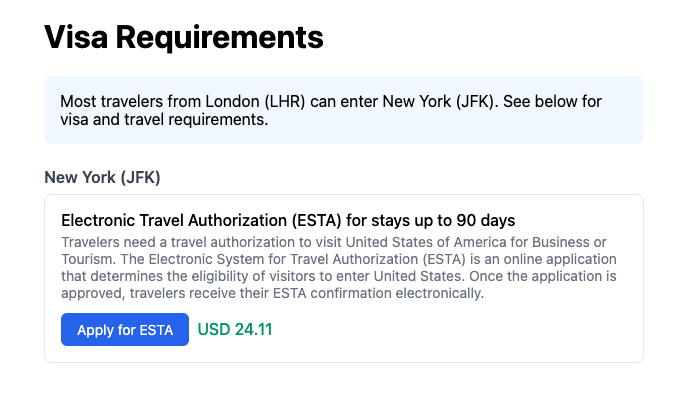
Here's what the rendered result looks like:
Key concepts
Finding visa requirements
Filter informationGroups by type to get only visa-related requirements:
const visaGroup = informationGroups.find(group => group.type === 'VISA_REQUIREMENTS');
Looking up requirement details
Requirements are referenced by ID. Use the included array to get full details:
const requirementsMap = response.included.reduce((map, item) => {
  map[item.id] = item;
  return map;
}, {});

// Later, look up by ID
const details = requirementsMap[requirement.id];
Handling actions
Each requirement can have actions. For Sherpa-provided visas, open the application URL:
actions.forEach(action => {
  if (action.provider === 'sherpa' && action.url) {
    // Link to Sherpa's application flow
    window.open(action.url, '_blank');
  }
});
Enforcement levels
| Level | Meaning |
|---|
MANDATORY | Required for travel |
NOT_REQUIRED | Not needed |
MAY_BE_REQUIRED | Depends on circumstances |
Next steps
- Add support for other requirement types (
DOCUMENTS_AND_FORMS, PUBLIC_HEALTH_REQUIREMENTS)
- Handle multi-leg trips with layovers